A port scan is often the first step in understanding what a host exposes to the network. You find an open port, identify the service behind it, and continue from there. The problem is that these two steps are not always as closely connected as they look. An open port only tells you that something answered the connection. That something may be the service itself, but it may also be a security device or proxy sitting in front of it. Knowing the difference is what separates a port being open from a service actually being there.
Here is a scan result:
$ nmap -Pn -sS -p 22,443 example.com
PORT STATE SERVICE
22/tcp open ssh
443/tcp open https
Looking at that, it is easy to conclude the machine runs SSH on 22 and a web server on 443. This was a SYN scan, so open here means only that the target answered our SYN with a SYN/ACK, and what produced that SYN/ACK is a separate question. The names in the SERVICE column carry even less weight: in a default scan they are the service names conventionally associated with those port numbers.
One case is worth separating out. A port can answer while the service you are after sits somewhere else, or is gone entirely. The port really is accepting connections; what may be absent is the backend, because the reply can come from something else along the path. Nmap reports closed and filtered separately when a port is shut or unreachable, so the interesting problem sits behind the ports that do answer. A working service and a device behaving like one produce the same line. Carry on without separating them and you end up with wrong service data, and security findings built on top of it.
A port scan’s job is to find out whether you can reach the port. open says a connection could be made during the scan, and that is the extent of the claim.
Service detection goes a step further and tries to work out which protocol and which product is on the other side. Nmap does this with -sV, sending protocol-specific probes and matching the replies against a signature database.
$ nmap -Pn -sV -p 22,443 example.com
PORT STATE SERVICE VERSION
22/tcp open ssh OpenSSH 9.6p1 Ubuntu 3ubuntu13.5
443/tcp open ssl/http nginx 1.24.0
The gap between the two outputs matters. The first says you can reach the port. The second makes a claim about what is on the other end. Those are not the same kind of claim, and most of this post is about how far the second one can be trusted.
When you connect to an IP address, what answers is sometimes a device in front of the application rather than the application itself. Some of these devices pass packets along, others accept the connection themselves.
That distinction changes the result. If the security device passes traffic through, the server behind it completes the handshake and the open you see is real. If the device accepts the connection itself, you see the same open, and it now describes the device rather than the server.
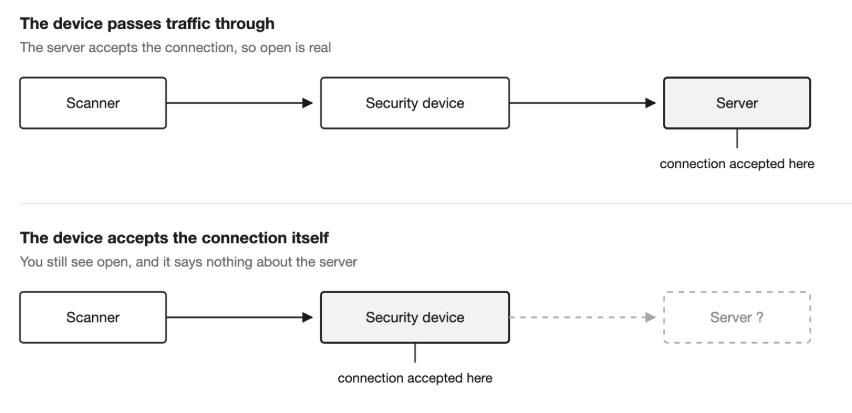
There are a few ways the second case shows up. A device using a SYN proxy completes the handshake itself and connects to the backend only once the client looks legitimate, so your connection succeeds while the backend may still be untouched. Some load balancers forward packets while others terminate TCP themselves and open a separate connection behind. CDNs and reverse proxies go further and speak HTTP and TLS as well, which means the certificate and the Server header you see may have been produced with the backend out of the picture.
The extreme version of this is done on purpose. Tools like Portspoof answer on every TCP port and return a different service banner for each one. On a host like that hundreds of ports look open, they all show the same TCP behaviour, and the banners contradict each other: an ancient OpenSSH next to a current nginx next to an IIS from 2003. What you are looking at there is a decoy.
All of the checks below go past the handshake and into the protocol, which is where the difference between a port and a service actually shows.
In many protocols the service states its own identity in plain text as soon as the connection opens. This is called a banner:
$ nc -nv 203.0.113.44 22
Connection to 203.0.113.44 22 port [tcp/*] succeeded!
SSH-2.0-OpenSSH_9.6p1 Ubuntu-3ubuntu13.5
The OpenSSH 9.6p1 in nmap’s -sV output comes from here. A banner is much better evidence than a port number. Announcing yourself as OpenSSH is also easy, and a device upstream can return the same sort of text, so a banner supports an identification rather than settling it.
To gain confidence that the banner came from a service that is actually running, look at how it reacts to the protocol itself. The simplest way is to send the wrong protocol deliberately:
$ printf ‘GET / HTTP/1.0\r\n\r\n’ | nc -nv 203.0.113.44 22
Connection to 203.0.113.44 22 port [tcp/*] succeeded!
SSH-2.0-OpenSSH_9.6p1 Ubuntu-3ubuntu13.5
Invalid SSH identification string.
A real OpenSSH sends its own banner first, sees that the incoming line is not an SSH identification string, and closes the connection on that basis. A tool imitating a banner, or a generic listener, usually gets that reaction wrong.
The same idea scales up. Completing the TLS handshake, or sending EHLO to an SMTP port and reading the capability list back, shows the other end really speaks the protocol. Nmap’s –version-trace output shows which probe produced which reply. Keeping that raw output is useful in automated scanning, because it lets you see later why a decision was made.
Connecting to a port and receiving nothing means different things depending on which side the protocol expects to speak first.
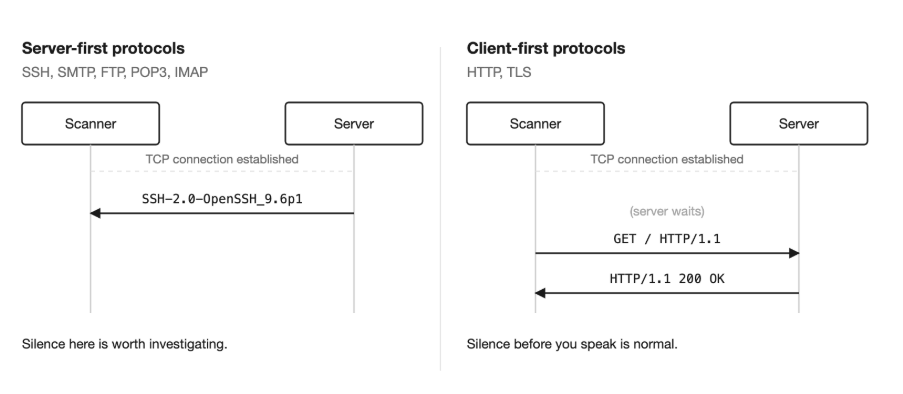
In SSH, SMTP, FTP, POP3 and IMAP the server speaks as soon as the TCP connection is up, which is why the SSH banner above arrived immediately. Silence there is genuinely suspicious.
In HTTP and TLS the server is waiting for you. A TCP connection to 443 opens and then nothing arrives, which is the protocol working as specified. On those ports the useful signal comes after you send the request.
On web ports the layer in front often gives itself away without being asked. The Via header is a proxy declaring itself, as the HTTP specification requires. X-Cache says the response passed through a cache, and CF-Ray says it passed through Cloudflare. Headers like these mean the layer producing the answer is visible at the application level too.
Error codes carry the same kind of information and get read backwards more often than anything else here. A 502 is usually taken as a missing service. It actually says a gateway failed to get a valid response from the system behind it, which is evidence that a layer sits in front of that system.
Some layers stay quiet. To find out whether one application is really producing the answers, change the hostname you send. It travels in two different places, so this takes two tests.
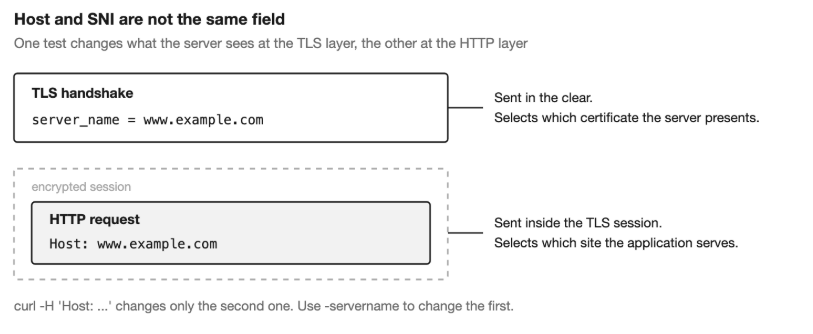
The Host header says which site the request belongs to:
$ curl -skI https://example.com/ -H ‘Host: www.example.com’
$ curl -skI https://example.com/ -H ‘Host: nope-12345.invalid’
A 404 or a 421 response for a host that does not exist can indicate that something in front of you is routing by name at the HTTP level. Both requests are identical at the TLS layer; only the header changed.
Certificates are chosen by SNI instead, so the TLS side needs its own test:
$ openssl s_client -connect example.com:443 -servername www.example.com </dev/null
$ openssl s_client -connect example.com:443 -noservername </dev/null
A different certificate when you drop SNI points at a layer selecting by hostname there too.
All of the above works from outside, and from outside the question usually stays a matter of probability. On an authorised engagement one command on the host gives you the answer directly:
$ ss -lntp
State Recv-Q Send-Q Local Address:Port Process
LISTEN 0 511 0.0.0.0:443 users:((“nginx”,pid=1042,fd=6))
This shows which port is really being listened on and which process is listening. Doing it once on a system you already understand, and calibrating how you read the external signals against it, noticeably improves your reading on the next target.
Each of these checks answers a narrow question. None of them answers the whole one.
Finding | What you know |
A SYN/ACK | Something answers on the port |
A banner | A service is announcing itself |
Protocol behaviour | The other end appears to really speak the protocol |
HTTP/TLS and Host/SNI tests | Extra signal about an intermediate layer |
ss output on the host | You can see the process that is listening |
In practice you stop when the checks stop disagreeing. Any one of them on its own is a guess. Three pointing the same way is something you can put in a report and defend.
Everything above describes work you would do by hand against a single host. On an external attack surface with hundreds of addresses, that work has to happen in the pipeline instead of in a terminal.
A port scan and a service scan produce lists of different lengths. One counts everything that answered. The other counts what could be identified, and the gap between those two numbers is usually where a security device or a proxy sits. Treating the first list as the second is how an inventory of addresses ends up standing in for an inventory of services.
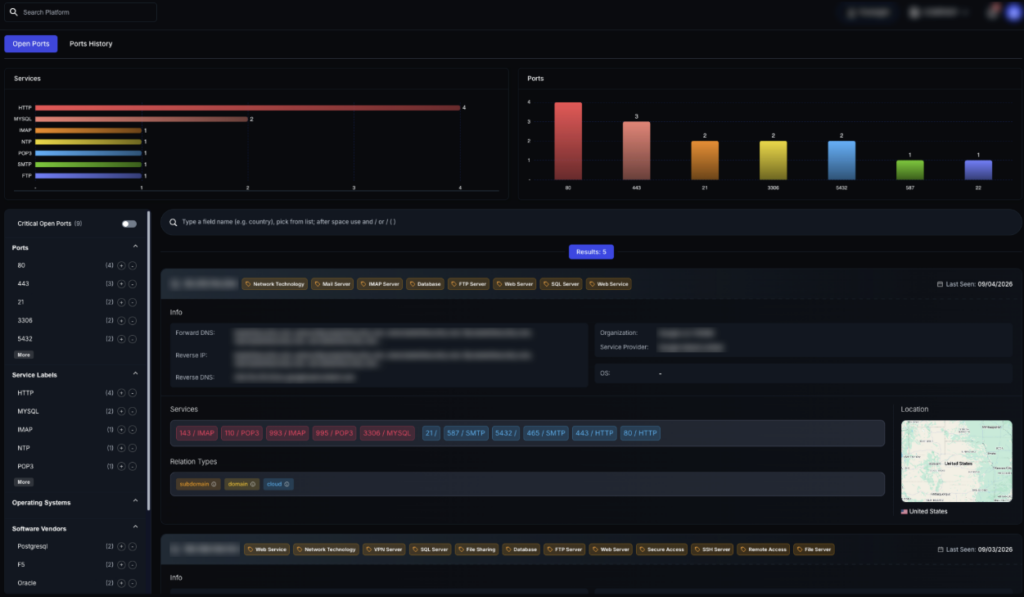
ThreatMon builds its port data from service detection rather than port state. Each port is taken through the protocol-level checks described in this post, and it enters a customer’s attack surface as an open port once a service has actually answered on it. The identification comes from what the service said, not from the port number it was found on.
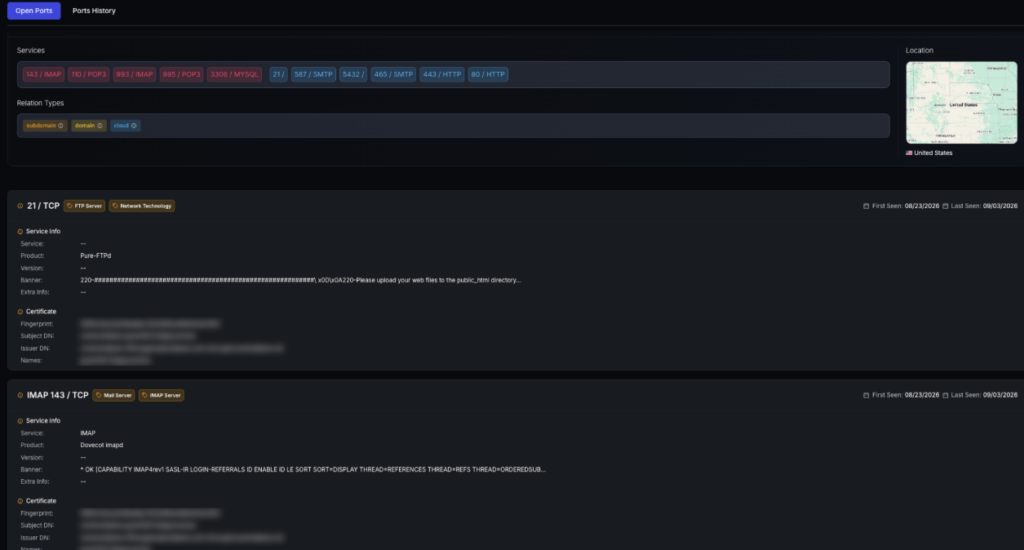
Making that distinction on one host is easy. The challenge is applying the same checks consistently across hundreds of assets. ThreatMon handles that as part of service discovery, so the resulting attack surface is built around the services that actually respond rather than ports that simply appear open.

More posts



Share this article
Found it interesting? Don’t hesitate to share it to wow your friends or colleagues
Subscribe to our blog newsletter to follow the latest posts