Two memory-safety vulnerabilities in NGINX’s HTTP/2 implementation let a remote, unauthenticated client corrupt memory inside a worker process. This article explains how HTTP/2 and NGINX fit together, how each flaw works, which systems are affected, and what to do about it.
NGINX sits at the edge of a large share of the internet. It serves websites, terminates TLS, fronts APIs, balances load across backend services, and acts as a reverse proxy for everything from small applications to Kubernetes clusters. In many environments it is the first application-layer component an outside party can reach.
That position is what makes a flaw in NGINX itself so uncomfortable. A bug in a backend application can be contained by the proxy in front of it. A bug in the proxy has nothing in front of it.
On November 18, 2026 the NGINX project released fixes for two vulnerabilities in its HTTP/2 module:
Both can be reached remotely and without authentication when HTTP/2 is enabled (the second also needs NGINX to act as a reverse proxy),, and both can end in memory corruption inside an NGINX worker. Under the right conditions, that can mean remote code execution (RCE) as the worker user.
Neither bug requires a vulnerable application behind NGINX. The web server is the target.
NGINX as the front door
In a typical reverse-proxy deployment, NGINX accepts client connections, decrypts TLS, parses the request, and forwards it to a backend service over a separate connection. Clients often speak HTTP/2 to NGINX while NGINX speaks HTTP/1.1 to the application.
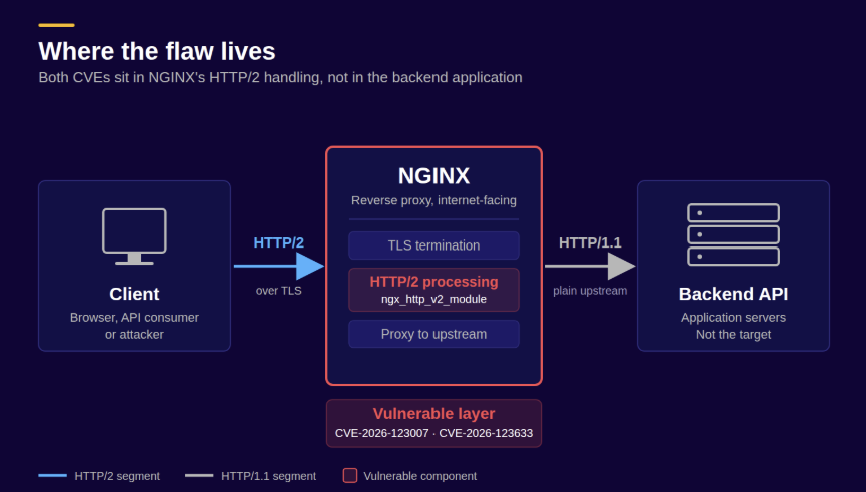
The vulnerabilities live in the HTTP/2 part of that picture, inside ngx_http_v2_module, not in the backend.
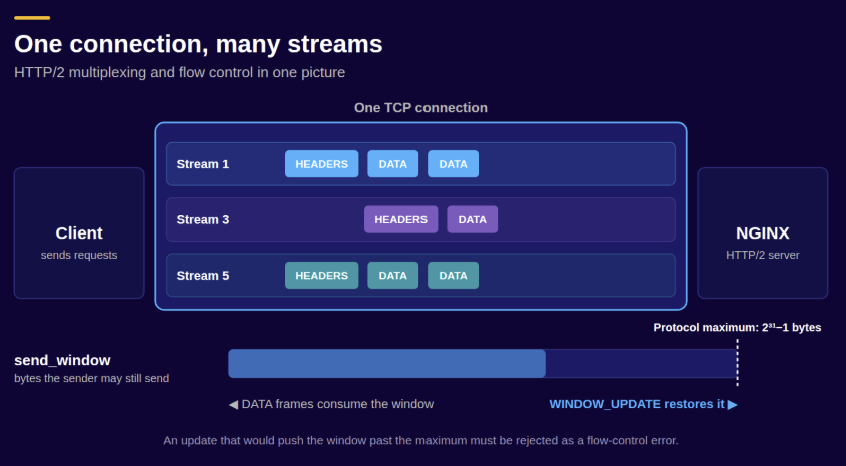
HTTP/1.1 typically spends one connection per in-flight request. HTTP/2 puts many requests on one TCP connection by splitting each into a stream and cutting the traffic into binary frames (HEADERS, DATA, WINDOW_UPDATE, GOAWAY and others). Frames from different streams are interleaved on the wire. That is efficient, and it moves a lot of bookkeeping into the server.
Flow control is part of that bookkeeping. A fast sender can bury a slow receiver, so each side keeps a window: the number of DATA bytes the peer may still send. Sending shrinks the window, and the receiver grants more room with a WINDOW_UPDATE frame. There is one window per stream and one for the whole connection. The specification caps a window at 2³¹−1 bytes, and an update that would push past that must be treated as a flow-control error.
The server also tracks connection state: which connections are busy, which are idle, and which it is allowed to close when it runs short of connection slots.
Both vulnerabilities come from mistakes in this bookkeeping.
The two issues are independent bugs in different code paths. They were fixed in the same releases, which is why they are discussed together.
CVE-2026-123007 | CVE-2026-123633 | |
Project title | Memory corruption in HTTP/2 flow control | Use-after-free in HTTP/2 |
NGINX severity | Major | Medium |
Root cause | Flow-control counter exceeds the protocol limit, then a bounds check underflows | Connection stays on the reusable list while a request is running on it |
Component | HTTP/2 flow control | HTTP/2 connection handling |
HTTP/2 enabled | Required | Required |
Reverse proxy | Not required | Required |
Extra condition | Large number of crafted WINDOW_UPDATE frames | Connection slots running low |
Authentication | Not required | Not required |
Worst case | Memory corruption, worker crash, RCE | Memory corruption, worker crash, RCE |
The difference in severity labels is worth reading correctly. Both are memory corruption in a network-facing process. What separates them is how much an attacker has to line up before the bug becomes more useful than a crash, and CVE-2026-123633 asks for more.
The setup
NGINX keeps a connection-level counter, send_window, for how much it may still send. When a client cancels a stream, any DATA still queued for that stream is discarded, and the allowance those queued bytes were holding is returned to the counter.
The bug
The return path adds the unused allowance to send_window without checking that the result still respects the protocol maximum. A client can therefore push the counter past 2³¹−1, a value the rest of the code assumes cannot exist.
The consequence shows up on the next WINDOW_UPDATE. The validation of that frame compares values with unsigned arithmetic. With the counter already out of range, the subtraction wraps around instead of producing a small number. The check passes when it should fail, and a bogus value flows downstream.
That value is eventually used as a length. It becomes a negative off_t in the SSL send path (ngx_ssl_send_chain), and the memory copy that follows runs past the end of its buffer on the heap.
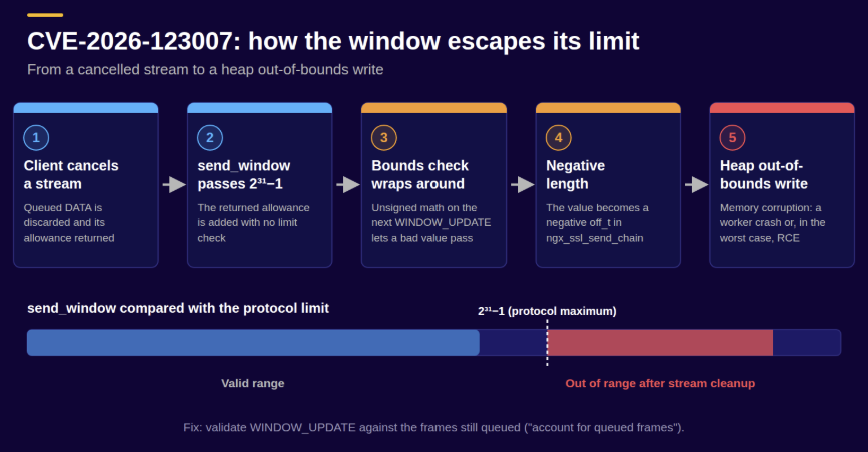
The upstream fix is titled “HTTP/2: account for queued frames when validating WINDOW_UPDATE”. It corrects the validation so queued frames are accounted for.
What an attacker needs
The reusable-connection list
To survive connection pressure, NGINX keeps a list of connections that are safe to sacrifice, typically idle keep-alive connections. When free slots run out, ngx_drain_connections() walks that list and closes entries to make room.
For HTTP/2, a connection with no active streams counts as idle. That includes a connection waiting for the rest of a HEADERS frame that arrived in pieces, so it is placed on the reusable list.
The bug
When the remaining bytes arrive, NGINX creates a request stream. The connection is now doing real work, but it is never taken off the reusable list. To the draining logic it still looks idle.
If the worker is short on connection slots at that moment, ngx_drain_connections() can select it. The close path tries to send a GOAWAY frame. If building that frame fails, the connection object is freed while the request still points at it. The next access is a use-after-free.
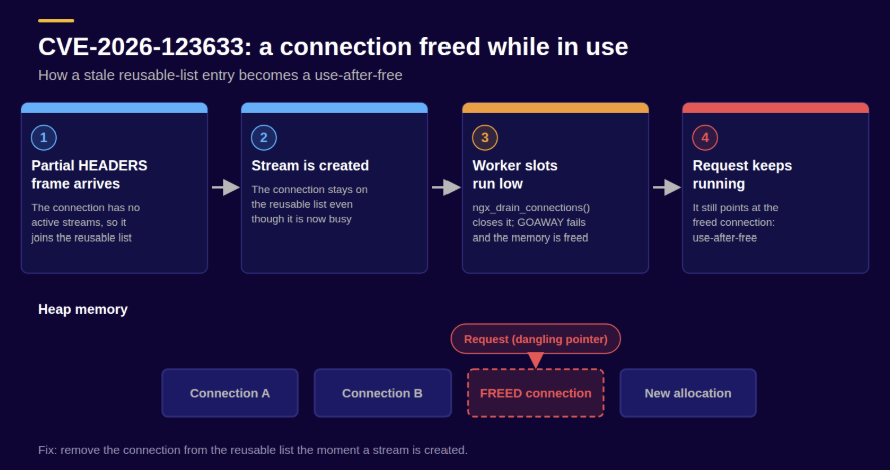
The upstream fix, “HTTP/2: reset reusable connection status on stream creation”, removes the connection from the reusable list at the moment a stream is created.
What an attacker needs
If an attacker reaches code execution, it runs as the NGINX worker user, usually www-data or nginx. That is not root, but it is enough to:
Without a working bypass for memory protections, the more likely result of an attempt is a worker crash. NGINX respawns the worker and carries on, so repeated crashes are a symptom to look for, not a sign the server is safe.
Researchers have demonstrated remote code execution for both vulnerabilities in controlled lab environments, including against official NGINX builds. Wiz confirmed working exploits for both flaws but said it would not release its code.
Exploit code is nonetheless public for CVE-2026-123007. Rapid7 has published a proof of concept that includes a working RCE exploit, demonstrated against NGINX 1.31.8. A public exploit has not been reported for CVE-2026-123633, so the two should not be treated as equally exposed on that point.
As of November 19, 2026, there are no confirmed reports of either vulnerability being exploited in the wild. That should not be read as low risk. The attack is unauthenticated, working exploitation techniques exist, and public code shortens the time between disclosure and real attacks.
Who is exposed
Realistic exposure includes:
Product | CVE-2026-123007 | CVE-2026-123633 |
NGINX Open Source | 1.9.5 – 1.31.8 | 1.19.7 – 1.31.8 |
Fixed in | 1.31.9 (mainline), 1.30.7 (stable) | 1.31.9 (mainline), 1.30.7 (stable) |
NGINX Plus (affected) | 37.1.0–37.2.0.1; 37.0.0–37.0.7.1 | 37.1.0–37.1.1; 37.0.0–37.0.6.1 |
NGINX PLUS (fixed) | 37.3.0.1; 37.0.8.1 | 37.2.0.1; 37.0.7.1 |
Linux distributions often backport security fixes without changing the upstream version number, so a version string alone can overstate or understate exposure. Compare against your distribution’s advisory and package changelog.
Step 1: Find the exposure
Check the version:
nginx -vCheck whether HTTP/2 is actually enabled on a listener, which matters more than whether the module was compiled in:
nginx -T 2>/dev/null | grep -nE 'listen .*http2|http2 (on|off)'Confirm from outside the network what the server negotiates:
curl -sI --http2 https://example.com | head -n 1

# "HTTP/2 200" means the endpoint speaks HTTP/2
If a CDN or load balancer sits in front, a positive result may describe the CDN’s listener and not your origin. Test the origin directly where it is reachable. If it is reachable when it should not be, that is a separate finding worth fixing.
Step 2: Patch
Upgrade to 1.31.9 on the mainline branch or 1.30.7 on stable. For NGINX Plus, use the fixed releases listed in the F5 advisories. A reload does not replace the running binary, so restart the service or perform a binary upgrade, then confirm the new process is the one running.
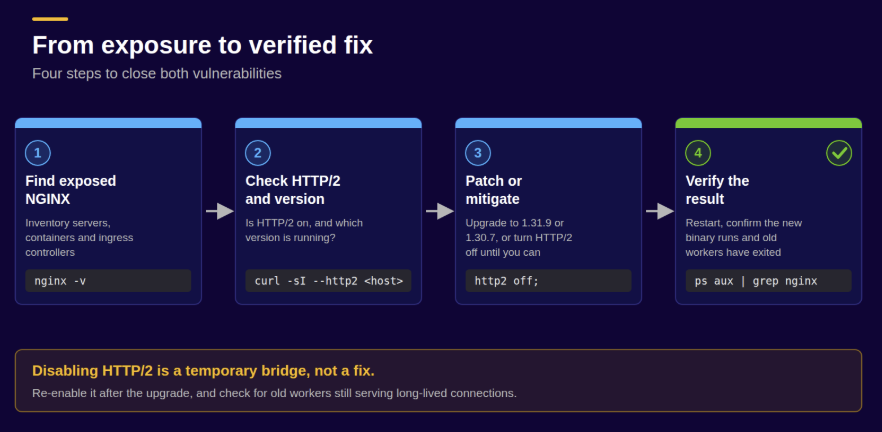
Step 3: If you cannot patch yet, disable HTTP/2
On NGINX 1.25.1 and later:
server {
    listen 443 ssl;
    http2 off;
}
On older versions, remove the http2 parameter from the listen directive. Then validate and reload:
sudo nginx -t && sudo nginx -s reloadOne detail catches people out. After a reload, old worker processes stay alive until their connections finish, and long-lived HTTP/2 connections can keep a vulnerable worker running for a long time. Check the process list for old workers and make sure they have exited, or restart the service.
Disabling HTTP/2 costs performance. Treat it as a bridge, and re-enable it after the upgrade.
Step 4: Look for signs of trouble
Unexpected worker exits, long-lived connections pushing unusual volumes of data, and processes spawned by an NGINX worker that have no business being there are all worth checking.
sudo grep -Ei 'worker process .* exited|signal 11|segfault' /var/log/nginx/error.logps -eo user,pid,ppid,args | grep '[n]ginx: worker'A crash does not prove exploitation, and a clean log does not prove safety. Both checks are cheap.
Priority | Action |
Critical | Inventory internet-facing NGINX, including containers and ingress controllers |
Critical | Determine which instances have HTTP/2 enabled |
Critical | Identify affected, unpatched versions |
High | Review reverse-proxy configurations |
High | Upgrade vulnerable deployments |
High | Disable HTTP/2 temporarily where patching is delayed |
Medium | Review worker crashes and unexpected child processes |
Medium | Verify the patched binary is the one running |
CDN and WAF layers should not be treated as complete protection. Whether an intermediary blocks the relevant traffic depends on where HTTP/2 terminates and how requests reach the origin.
CVE-2026-123007 and CVE-2026-123633 show how bookkeeping errors in a mature, widely deployed web server can become serious exposure. One starts in HTTP/2 flow-control arithmetic, the other in connection lifecycle management, and both can end in memory corruption reachable without credentials.
Neither is a one-request takeover, and public reporting describes both as hard to turn into reliable code execution. They still sit in the component that faces the internet, in a configuration most deployments use. The fix is a normal upgrade. The slow part is finding every copy of NGINX you run, including the ones bundled inside other products.
The two flaws in this article are part of a wider set that ThreatMon tracks as NGINX2Root: five NGINX vulnerabilities (CVE-2026-123007, CVE-2026-123633, CVE-2026-123634, CVE-2026-121810 and CVE-2026-113425) that can lead to remote code execution through HTTP/2 and HTTP/3.
To make the first exposure check quicker, ThreatMon IntelHub offers a free Nginx2root Checker. Enter a URL and it shows which NGINX version the server reports and whether HTTP/2 and HTTP/3 are enabled. The check is read-only: no exploit traffic is sent, nothing is queried until you press Enter, and no account is needed.
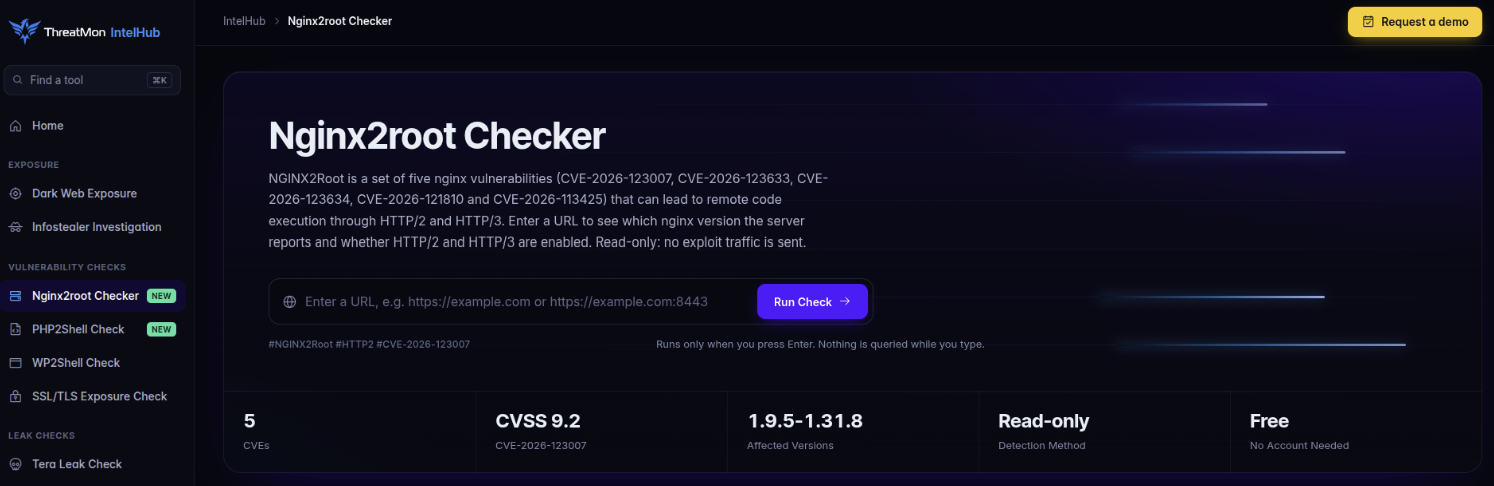
The checker reads what the server reports about itself, so treat the result as a starting point. Hidden version strings and backported patches can change the picture, which is why the version and configuration checks earlier in this article still matter.
Know your attack surface before the next one lands
The hard part of vulnerabilities like these is rarely the patch. It is knowing which NGINX instances exist, which of them face the internet, and which speak HTTP/2 or HTTP/3. The servers that stay unpatched are usually the ones nobody remembers: a forgotten staging host, an ingress controller, an appliance with its own bundled NGINX.
That inventory is an attack surface problem. ThreatMon’s attack surface management gives teams an outside-in view of their internet-facing assets, so exposure checks like the one above start from a complete list and not from memory.

More posts



Share this article
Found it interesting? Don’t hesitate to share it to wow your friends or colleagues
Subscribe to our blog newsletter to follow the latest posts